HFMA Community
HFMA Community
  • User
  • Site
  • Search
  • User
  • Community Home
  • My Groups
  • All Groups
  • Member Directory
  • Guidelines
  • Community FAQs
  • Join HFMA
  • HFMA Job Bank
  • More
  • Cancel
HFMA Community
HFMA Community
Community FAQs How do I add my profile and background image?
  • Wiki
  • Tags
  • Sub Groups
  • More
  • Cancel
  • New
  • -Community FAQs
    • -Welcome to the HFMA Community
      • How do I review and edit my profile?
      • How do I add my profile and background image?
    • +All About Groups
    • +All About Content
    • +Managing Notifications
    • Connecting with Members
    • Adding Images and Documents
    • +Creating a Calendar Event
    • Set Your Time Zone

How do I add my profile and background image?

To add a profile and background image, please do the following:

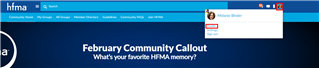
Click on the profile image area at the top right of the Community. Select Profile from the menu:
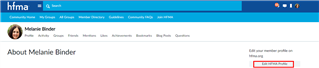
On the next page, click on the Edit HFMA Profile button:
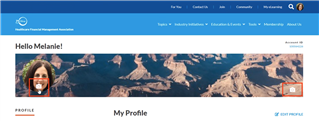
To add or edit your profile and cover images, hover over each area until you see the camera icon appear: 
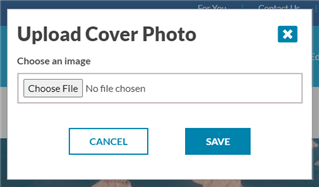
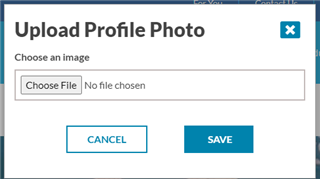
Click on each camera icon to add your images. Browse to choose files from your computer images: 
         

  • Add background image
  • Community FAQs
  • Add profile image
  • Share
  • History
  • More
  • Cancel
Related
Recommended

Membership

  • Join HFMA
  • Membership Benefits
  • Referral Program
  • Renew Membership
  • Sign in Help
  • International Membership

About HFMA

  • History of HFMA
  • Board of Directors
  • Bylaws & Code of Ethics
  • Executive Management
  • Press Releases
  • Volunteer Opportunities

Resources

  • Find a Chapter
  • Marketing & Sponsorship Opportunities
  • Chapter Resource Center

Connect

2001 Butterfield Road, Suite 1500
Downers Grove, IL 60515

P. (708) 531-9600

F. (708) 531-0032

E. inquiry@hfma.org


© 2022 Healthcare Financial Management Association

Privacy PolicyTerms of Use